Your accountant can set things up so that you are notified by email when a Peppol invoice arrives in your company file. You then receive the invoice in PDF format in your mailbox, provided the supplier has embedded the PDF in the XML file.
You can't turn this notification on yourself in Lucy. This always goes through your accountant.
How does it work?
- In Lucy, the setting is called Forward Peppol invoice.
- Only your accountant can set it up, in their own Lucy environment, for your company file.
- You receive an email with the invoice as a PDF attachment. If there is no PDF in the XML, there is no attachment to send either.
- You can set one email address per company file.
Do you work with an accountant?
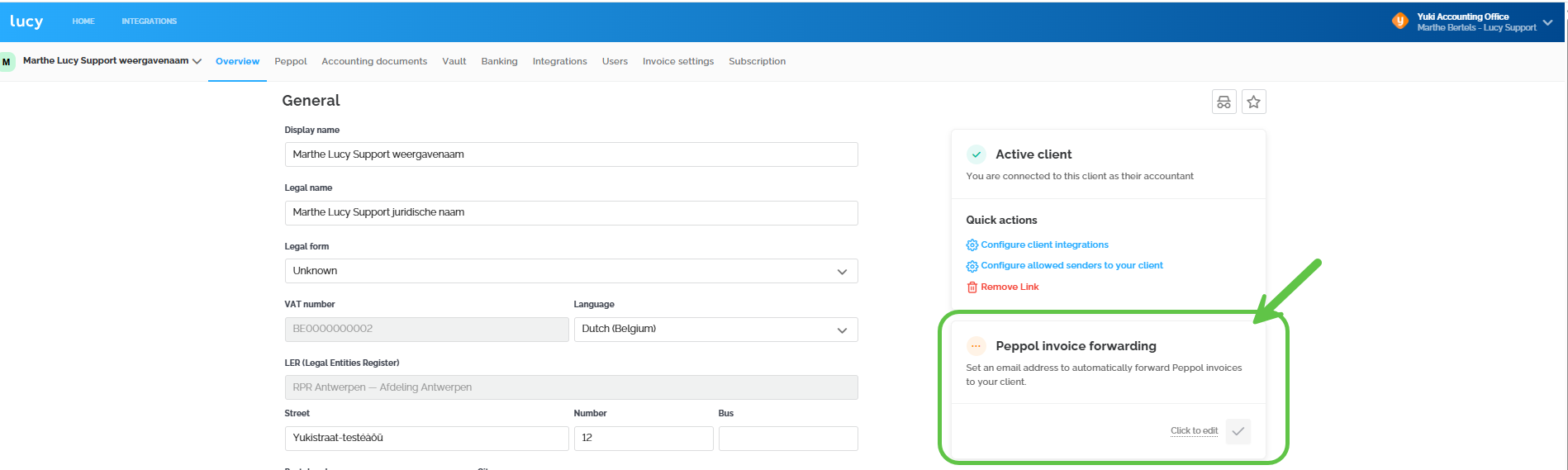
Ask your accountant to turn on Forward Peppol invoice with your email address. Your accountant does this as follows:
- Open the client list.
- Open your company file.
- Go to the client details.
- Enter the email address on the Forward Peppol invoice card.
No longer want to receive these emails? Ask your accountant to clear the email address. Forwarding stops immediately.
Do you work without an accountant?
Then you can't be notified by email of new Peppol invoices. There is no field in your own Lucy environment to set this up yourself.
As an entrepreneur, it's then up to you to log in to Lucy regularly and keep a close eye on your inbox.
What does the email look like?
This is what to look for in your mailbox:
- Sender: Lucy
- Subject: a notification that your accountant is forwarding a document to you
- Content: the name of the supplier who sent the invoice
- Attachment: the invoice as a PDF
You don't need to forward this invoice to your accountant. They have already received it via Peppol. The email itself says so too.
Did you receive these emails before, but not anymore?
Then the issue is usually not the setting, but the delivery of the email. Go through these steps, in this order:
- Is the email address still correct? Ask your accountant to check the email address under Forward Peppol invoice. A single typo is enough to stop the emails, without any error message.
- Check your spam and junk mail. Found the email there? Drag it to your inbox and mark the sender as safe.
- Have the spam filter checked. Often the email does reach your mail server, but the spam filter then blocks it. In that case you won't see the email anywhere, not even in your spam folder. Check with your IT administrator or email provider.
- Still no emails? Contact support. Give us the email address, along with the invoice number and date of an invoice you didn't receive, so we can check the delivery.