In this article, we explain how you as an entrepreneur (or your accountant) can manage VAT rates within the Invoice Settings. You will learn how to adjust existing rates and how to easily add new ones.
Overview of VAT rates
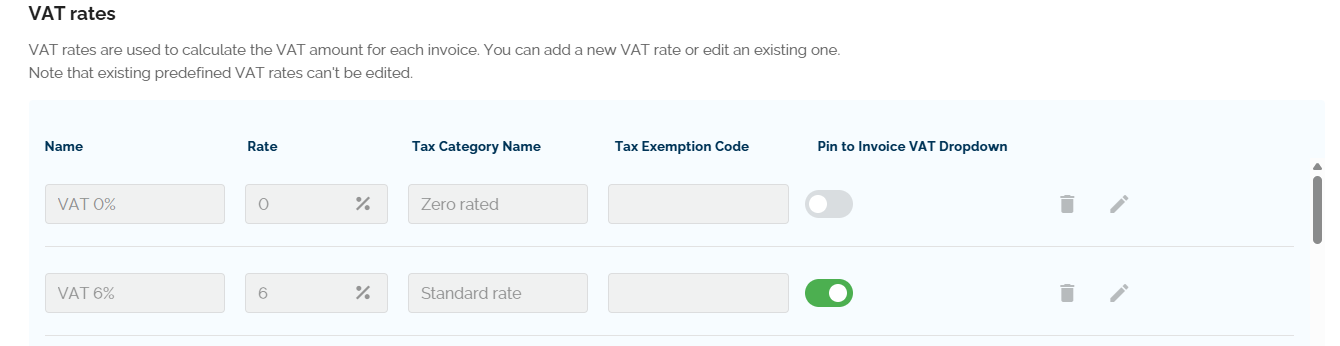
Under Invoice Settings, you will find a complete overview of all available VAT rates.
- VAT rates predefined by Lucy are fixed. These cannot be edited or deleted.
- You decide which rates are visible when creating a sales invoice. Use the toggle switch next to a rate to enable or disable it as an option.
Adding a VAT rate
Do you need a specific VAT rate that is not yet in the list? You can easily add manual rates in this section.
How do I add a rate?
- Click the button "+ Add VAT rate".
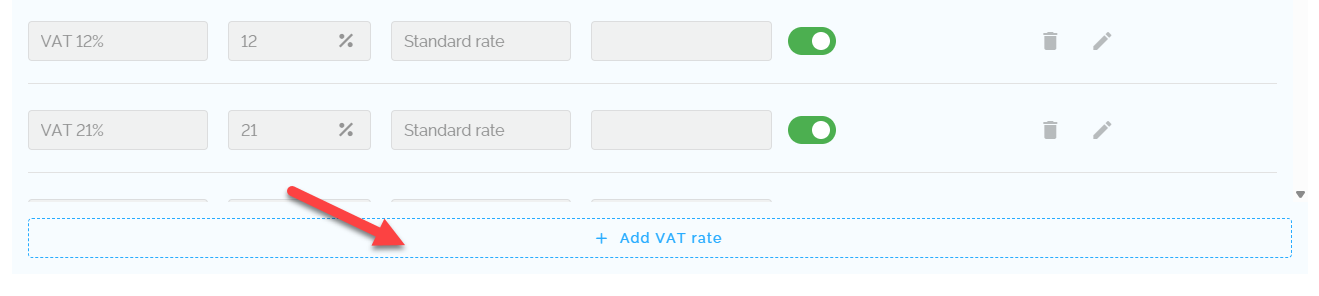
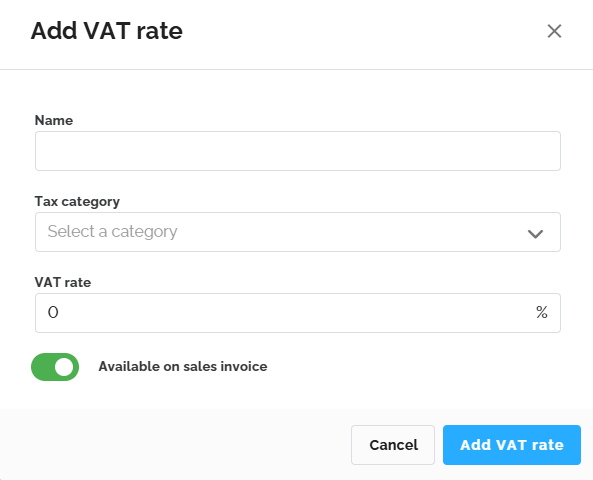
- Enter the following details:
- Name: Enter a personalized name for the VAT rate.
- Tax Category: Select 'Standard rate' to create a standard VAT rate.
- VAT Rate: Enter the desired VAT percentage. You can use up to 2 decimal places.
- Toggle: Use this switch to determine if this VAT rate should be immediately available when creating an invoice.
The new VAT rate will be added to the bottom of the overview and is immediately ready for use on your sales invoices.